THE DANCE FAMILY APP

The iPhone planner for dance moms and dads.

Ovation keeps a dance family’s season in one place: every class and pickup, every competition weekend, and every result. Send it the schedules dance parents already get—a photo, a PDF or pasted text—and check what it found before anything is saved. The free plan covers one dancer and your first two AI imports; Ovation Pro adds up to four dancers and imports with no limit.
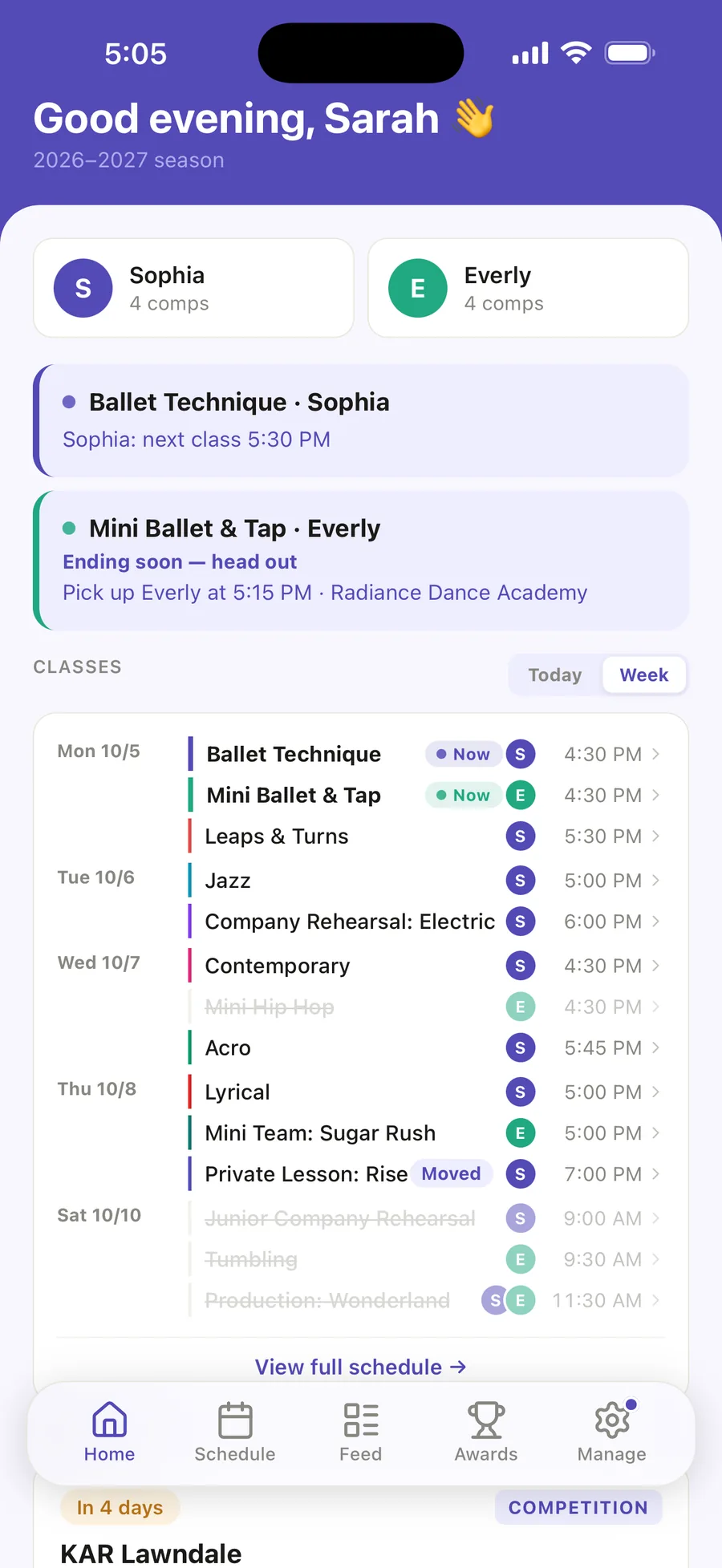
Ovation Home for Sophia and Everly: Sophia’s next class at 5:30 PM, Everly’s pickup at 5:15 PM, and the whole week of classes for both girls, with Saturday’s three classes struck through for the KAR Lawndale weekend.

01 · THE WEEK

A dance parent’s week.

Home shows today’s classes, or the rest of the week, for every dancer. Ovation reminds you before class and before pickup, and each class keeps what to bring and what the teacher said.
  • Class reminders 30 minutes, 1 hour or 90 minutes before; pickup reminders 5, 10 or 15 minutes before class ends.
  • Skip one date, or change one class’s time for just that day, without touching the rest of the season.
  • Studio closures and days away show as skipped, with no class reminder.
  • Class essentials—shoes, tights, a water bottle—and notes from class, on the class itself.
  • A Home Screen or Lock Screen widget with your next class and when to pick up (iOS 17 or later).

How the class schedule gets in

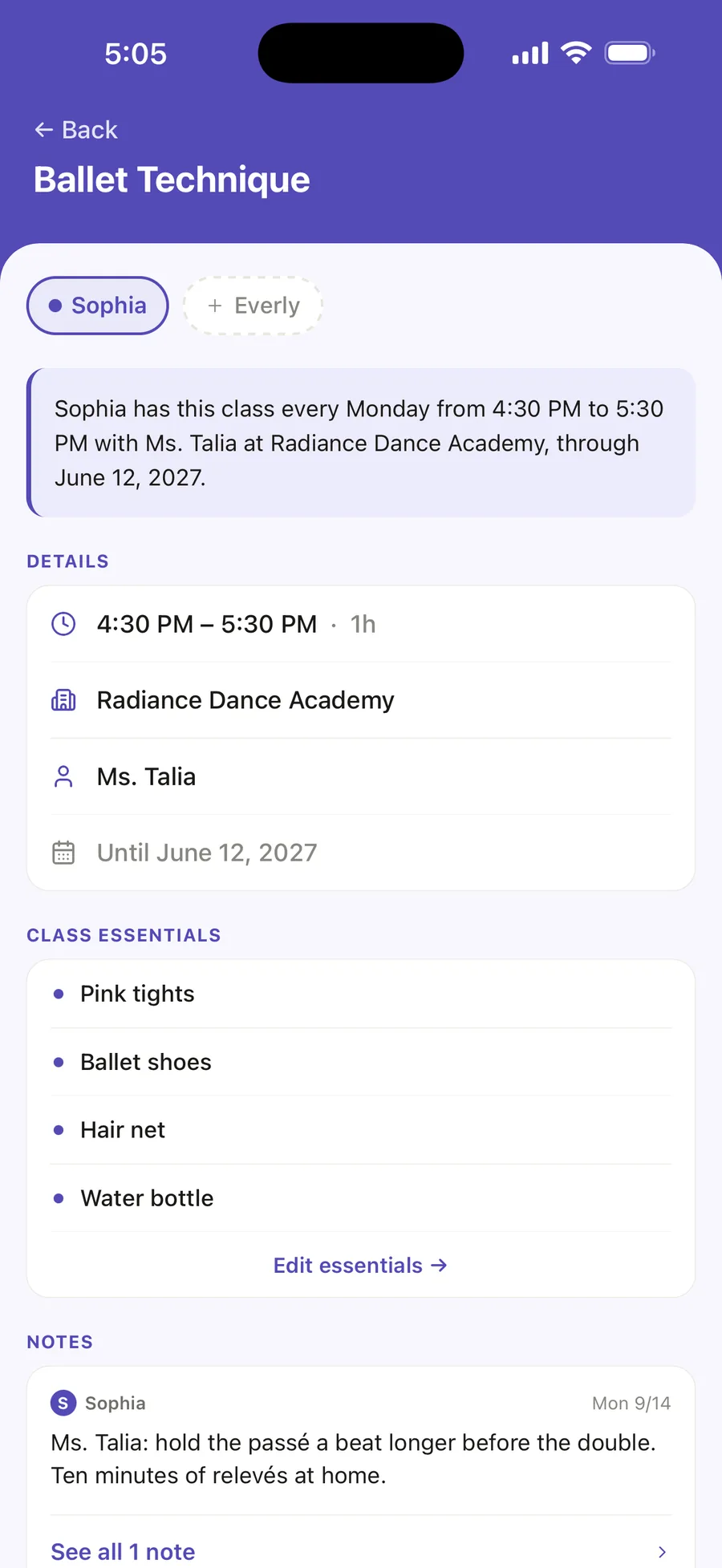
Sophia’s Ballet Technique class page: every Monday 4:30 to 5:30 PM with Ms. Talia at Radiance Dance Academy, its class essentials, and a note from the teacher.

02 · COMPETITION WEEKEND

Call times, quick changes, and the right costume.

Add the competition with just its dates. When the running order arrives, import it and pick your dancer’s entries: their times, call times and entry numbers fill in the Day tab, which marks the next routine NEXT UP on the day.
  • Running late? Choose the delay, and every time on the page moves with it.
  • The time between routines is colored, and quick changes under 30 minutes are counted.
  • Tap a routine for its look: costume, hair, makeup, shoes and accessories.
  • A packing checklist of every routine’s look and the family’s bag, the week before.
  • The Awards row shows when to be seated, and directions are one tap away.

The whole competition season

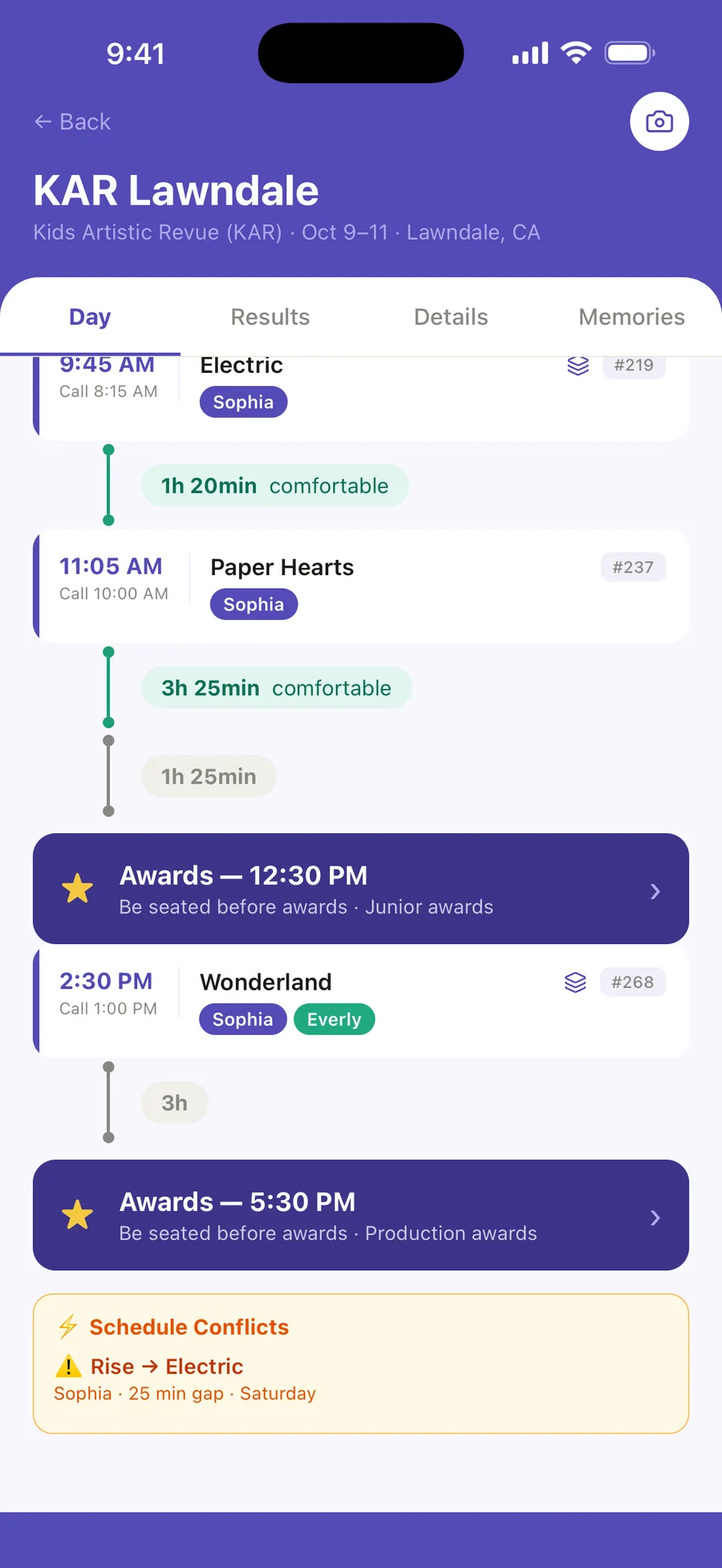
The KAR Lawndale Day tab: Electric and Paper Hearts with their call times and entry numbers, Awards at 12:30 PM and 5:30 PM with be seated before awards, Wonderland for Sophia and Everly, and a schedule conflict, Rise to Electric, a 25 min gap.

03 · AFTER THE WEEKEND

Results, the season recap, and the photos.

Import the results sheet—Ovation finds your dancer’s routines and fills in their awards for you to check—or type them in. The Awards tab adds up the season.
  • Placements, special awards, scores and the judges’ notes, kept with each routine.
  • Season recap puts the season on one card to share or save to Photos.
  • Photos and videos saved as memories, tagged with your dancer, the competition and the routine.
  • Tag the awards a photo shows, and it appears beside those results.

Routines, looks and results What the awards mean

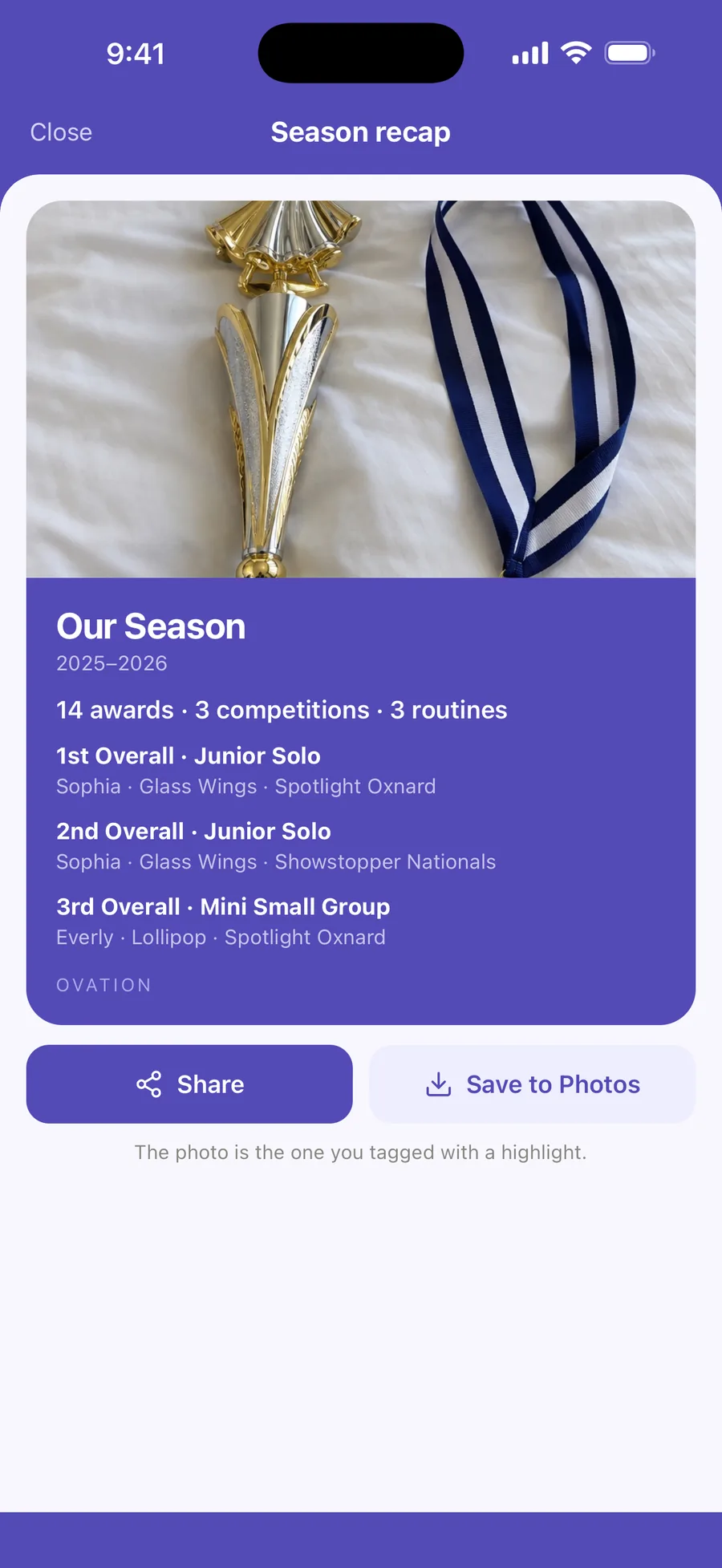
The Season recap card for 2025–2026: a tagged photo of a trophy and medal, 14 awards, 3 competitions and 3 routines, the top results, and Share and Save to Photos.

MORE THAN ONE DANCER

Siblings, in one calendar.

Each dancer gets their own color, schedule, routines and awards in the same account. Tap a name to see one dancer, or All for everyone.

  • Shared classes, once A class two dancers share is added once, with both of them in it.
  • Different studios The studio belongs to each dancer, so siblings can be at different studios.
  • Up to four dancers The free plan includes one dancer; Ovation Pro holds up to four.

FREE AND PRO

Start free. Add Pro when the season needs it.

Free

$0

  • One dancer
  • Your first two AI imports
  • 50 photos a season
  • Classes, competitions, routines and looks, packing, results and reminders

Ovation Pro

$49.99 a year, or $6.99 a month

  • Up to four dancers
  • AI imports with no limit
  • Photos with no season limit
  • Video

You pay through your Apple Account. A free trial is offered when Apple says your account can have one. Pro renews automatically unless you cancel at least 24 hours before the period ends. More about Ovation Pro

YOUR STUDIO, ANY COMPETITION

Works with your studio and any competition: you import the schedule you already have.

The studio’s timetable and season calendar, and the competition’s running order, go in as a PDF, a photo, or text pasted from an email or portal. Ovation remembers which entries were your dancer’s, so next time they are ticked for you. Studios and competition companies can be found in Ovation’s directory, or typed in.

Event dates and venues are there to help you plan and may change. Always confirm with your studio or the company.

Your studio’s portal and the competitions’ own apps still have their jobs. Which kind of dance app does what

Common questions

Before you download

Is Ovation only for iPhone?

Yes. Ovation is an iPhone app, downloaded from the App Store.

What does Ovation cost?

Ovation is free to start. The free plan has one dancer, your first two AI imports, and 50 photos a season. Ovation Pro is $49.99 a year or $6.99 a month, paid through your Apple Account, and holds up to four dancers, AI imports with no limit, photos with no season limit, and video. It renews automatically unless you cancel at least 24 hours before the period ends.

Can I add more than one dancer?

Yes. The free plan includes one dancer, and Ovation Pro holds up to four, the most one account can have. Each dancer gets their own color, schedule, routines and awards, and a class two dancers share is added once, with both of them in it.

Does it work with my studio’s schedule?

You import the schedule you already have: a photo or PDF of the timetable, or its text pasted from the studio’s email or portal. You check every class before it is saved. You can also add classes by hand, which is free.

Is this the OVATION dance competition?

No — Ovation is a planning app for dance families by Selvi Labs, not affiliated with OVATION by DanceOne.

FOR THE WHOLE SEASON

Less sorting schedules. More time in the audience.

Ovation for iPhone. Free to start, one dancer included.