The four kinds of dance app
| Kind | What it’s for | Who runs it | What it covers | Examples |
|---|---|---|---|---|
| Studio portal | Registering, paying, and hearing from the studio | Your studio, on its studio software | One studio: classes, account, payments, messages | Jackrabbit, Studio Pro (DanceStudio-Pro) parent portals |
| Competition-company app | That company’s event weekend | The competition company or its media partner | One company’s events: schedules, live updates, results, photos and video | KAR, Showstopper, StarQuest, DanceBUG |
| Family calendar | Everyone’s dates in one shared calendar | You and your family | The whole household, dance included, as events | Cozi, Google Calendar |
| Dance family planner | A dancer’s whole season, built around dance | You and your family | Every studio and competition: classes, routines, costumes, competition days, awards | Ovation, Dancify, Dance Mom HQ |
Examples, not a complete list. Each link is the app’s own listing or website, read October 4, 2026.
Studio portals
Your studio chooses its studio-management software, and the parent portal comes with it. It is where you sign up for classes, pay tuition and hear from the front desk. You don’t choose it; you get a login from the studio. What you can do in it depends on what the studio has switched on.
- Jackrabbit Dance describes its Parent Portal as “a central place for families to access account details, enroll in classes and events, receive important messages, schedule makeups and future absences, review skill progress”. Studios can also have their own branded app.
- Studio Pro (DanceStudio-Pro’s address now leads to Studio Pro) lists online class registration, online payments and store access, weekly student schedules, studio chat with push notifications, and recital and event tickets for parents. Its Studio Pro Portal app on the App Store says what you can do depends “on your studio’s enabled settings”.
Sources: Jackrabbit Dance, Parents & Families; Studio Pro, Dance Studio Apps; Studio Pro Portal on the App Store (free; updated September 11, 2026); all read October 4, 2026.
Competition-company apps
Many competition companies have their own app for their own events, and some use a media partner’s. On the weekend, these are where the company’s own live information is: the running order as it happens, announcements, results, and photos and videos. Outside that company’s events, they don’t hold the rest of your season. From their App Store listings:
- KAR (Kids Artistic Revue): “schedules, facility maps, results & exclusive photo and videos”. Free; updated August 27, 2026.
- Showstopper: “Competition schedules and live ‘Next Up’ performance tracking”, its live stream, “Personal routine schedules”, and “Photo, video, and trophy order links”. Free; updated July 3, 2026.
- StarQuest Dance, made with DanceComp Genie: “Parents can view and download the competition media for their dancers.” Free; updated September 21, 2026.
- DanceBUG, a media app used by partnered competitions: purchased photos and videos, live streams of “available dance competitions”, “Track Dancer Routines with Notifications” and “View Live Schedules”. Free; updated August 30, 2026.
Sources, each its App Store listing: KAR; Showstopper; StarQuest Dance; DanceBUG; all read October 4, 2026.
Family calendars
A shared family calendar puts everyone’s plans in one place: work, school, sport and dance. It knows dates and times, and it is good at reminders and sharing. It doesn’t know what an entry number, a call time or a quick change is, so dance goes in as ordinary events.
- Cozi Family Organizer: a “shared calendar, reminders, grocery list and more”, a “simple color-coded calendar”, and the option to “Subscribe to other calendars you use like … school calendars … and team schedules”. The whole family shares one account. Free; updated August 31, 2026.
- Google Calendar: “shared calendars, so they can view, add, or modify events”, month, week and day views, and tasks. Free; updated September 28, 2026.
Sources, each its App Store listing: Cozi Family Organizer; Google Calendar; both read October 4, 2026.
Dance family planners
A dance family planner is built around a dancer’s season: classes at the studio, competition weekends from any company, the routines, costumes and packing, and the results. You run it, so it holds everything that is yours, whichever studio and competitions it comes from. Each puts the weight in a different place:
- Dancify: Dance Mom Sidekick’s listing leads with sharing among the team: “Instantly share dance routines using unique dance codes”, a “Built-in chat for dance moms, dancers, and teachers”, and “Track routines, costumes, photos, and notes”, packing lists and awards. “Free for 14 days. … Access to all features requires an active subscription after your trial ends.” Updated September 17, 2026.
- Dance Mom HQ lists “Family Access”, a “Competition & rehearsal calendar”, a “Costume & quick-change tracker”, “Venue, hotel & travel details”, reminders and several dancers. Free download; updated June 27, 2026.
- Ovation, ours, puts the weight on getting the schedules in for you: it reads them from a photo, a PDF or pasted text. More below.
Sources, each its App Store listing: Dancify: Dance Mom Sidekick; Dance Mom HQ; both read October 4, 2026. Ovation: its help articles, linked below.
How they fit together
A typical competition family’s season, app by app:
- Before the season, register and pay for classes in the studio’s portal.
- The weekly schedule goes into your planner or family calendar, once, from the studio’s timetable.
- Competition season: the studio sends the running order. Your dancer’s routines, call times and costumes go into your planner.
- On the weekend, the company’s own app (if it has one) shows its live running order and its photos; your planner keeps your dancer’s day.
- After the weekend, the results go into your planner, and the studio portal goes back to tuition and recital tickets.
If schedules are simple and you have one dancer, a family calendar may be all you need beside the portal. The more dancers, studios and competitions you have, the more a planner earns its place.
Where Ovation fits
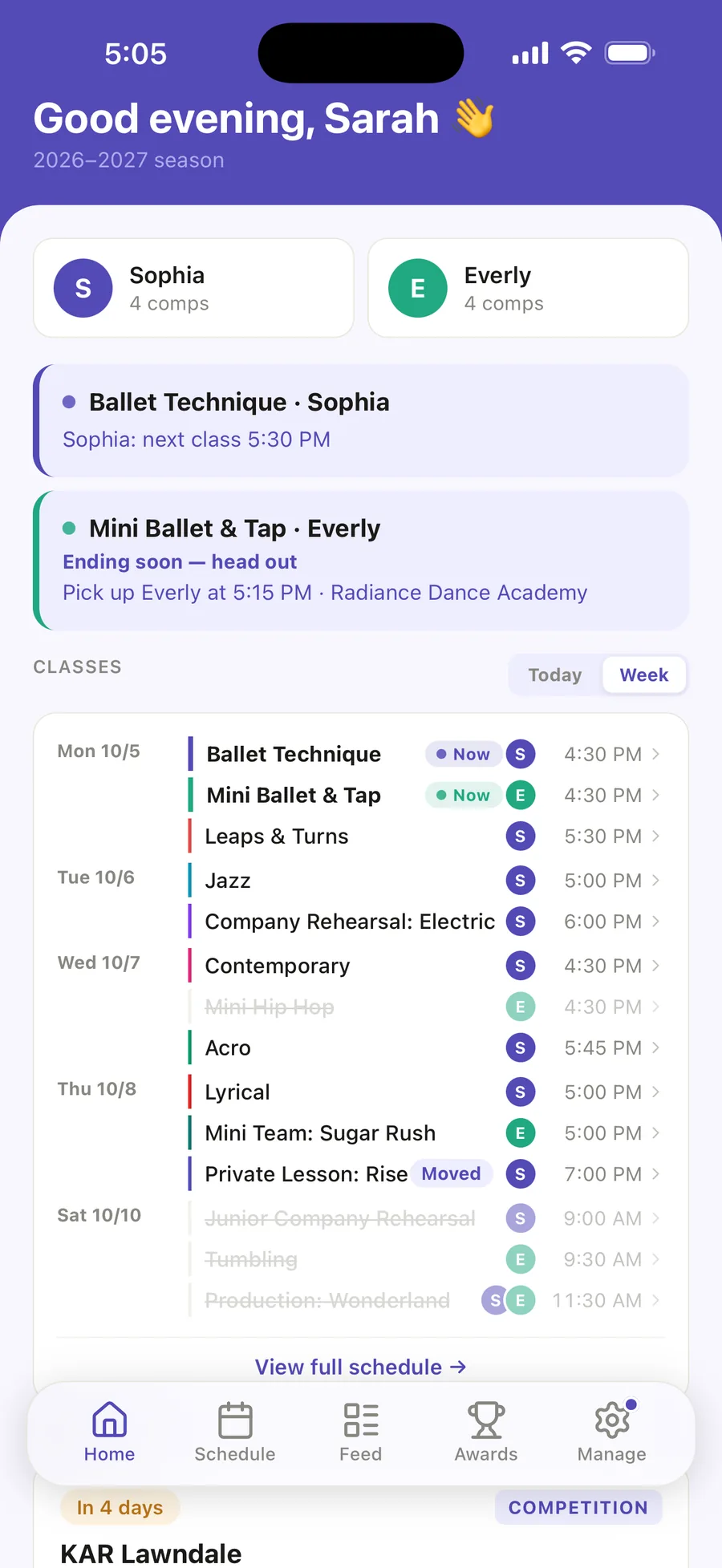
Ovation is the dance family planner for iPhone that we make. You send it what you already have, as a photo, a PDF or pasted text: the studio’s class timetable, its season calendar with closures, and each competition’s running order. You check what it found before anything is saved.
On a competition day, its Day tab lists your dancer’s routines in order with times, call times and entry numbers, counts the quick changes under 30 minutes, and moves every time when you set a delay. Each routine keeps its look, and a packing checklist gathers them the week before. Afterwards, Ovation reads the results sheet, and the Awards tab adds up the season.
The free plan has one dancer and your first two AI imports. Ovation Pro holds up to four dancers, with no limit on imports, for $49.99 a year or $6.99 a month.
Import a class schedule Import the studio calendar Add a competition schedule Competition day Routines and looks Packing checklist Import results The Awards tab More than one dancer Free and Pro
When Ovation is not the right fit
- Your family is on Android. Ovation is an iPhone app only.
- You need registration or billing. Ovation doesn’t enroll your dancer or take payments for the studio. That is the studio portal’s job, and studios that need it should look at studio software like the portals above.
- You want one company’s live schedule. On a competition day, Ovation’s times are the ones you imported, moved by the delay you set. The company’s own app, where it has one, shows its running order live.
How we checked
On October 4, 2026 we read each app’s own App Store listing (what it says the app does, who sells it, its price on the store and when it was last updated) or the company’s own website, and quoted it. We didn’t use ratings, review counts or the apps’ own superlatives, and we haven’t ranked anything: the page says what each kind of app is for. Apps change often; check the listing for today’s version. Selvi Labs makes Ovation, and is not affiliated with any other company or app on this page.
- Jackrabbit Dance, Parents & Families
- Studio Pro, Dance Studio Apps; Studio Pro Portal (App Store)
- App Store listings: KAR, Showstopper, StarQuest Dance, DanceBUG, Cozi Family Organizer, Google Calendar, Dancify: Dance Mom Sidekick, Dance Mom HQ
- Ovation: the help center
All read October 4, 2026.